- 443.561.1334
- info@edwps.com
- 8865 Stanford Blvd., Suite 202, Columbia, MD 21045
Popular: CMMC CCP Boot Camp Bookstore Contract Vehicles

info@edwps.com
8865 Stanford Blvd., Suite 202, Columbia, MD 21045
Popular: CMMC CCP Boot Camp Bookstore Contract Vehicles
8865 Stanford Blvd., Suite 202, Columbia, MD 21045
 Edwards LMS help
CMMC classes are booked in the Edwards LMS, our training portal. Here's every step, with screenshots, from picking your week to paying with your code.
Practice run
Click the glowing spot on each screen, right where you would in the real LMS. Nothing here is a real purchase.
Ready for real? Open the CMMC catalog (opens in a new tab)
About five minutes
Tap any screenshot to see it full size.
Tap Copy next to the code in the navy deals bar near the top of any CMMC page. Today's code is CMMCTraining!CS52026.
In the deals bar, tap See classes and dates, then Enroll on your class. Enroll copies the code for you. Or open the CMMC catalog and pick CCP or CCA. Clicking the course name or picture opens its page. Clicking the cart opens a quick view.
Click Choose Sessions or the Sessions tab. Each week shows its dates, instructor, and seats left. Click the price button on the week you want.
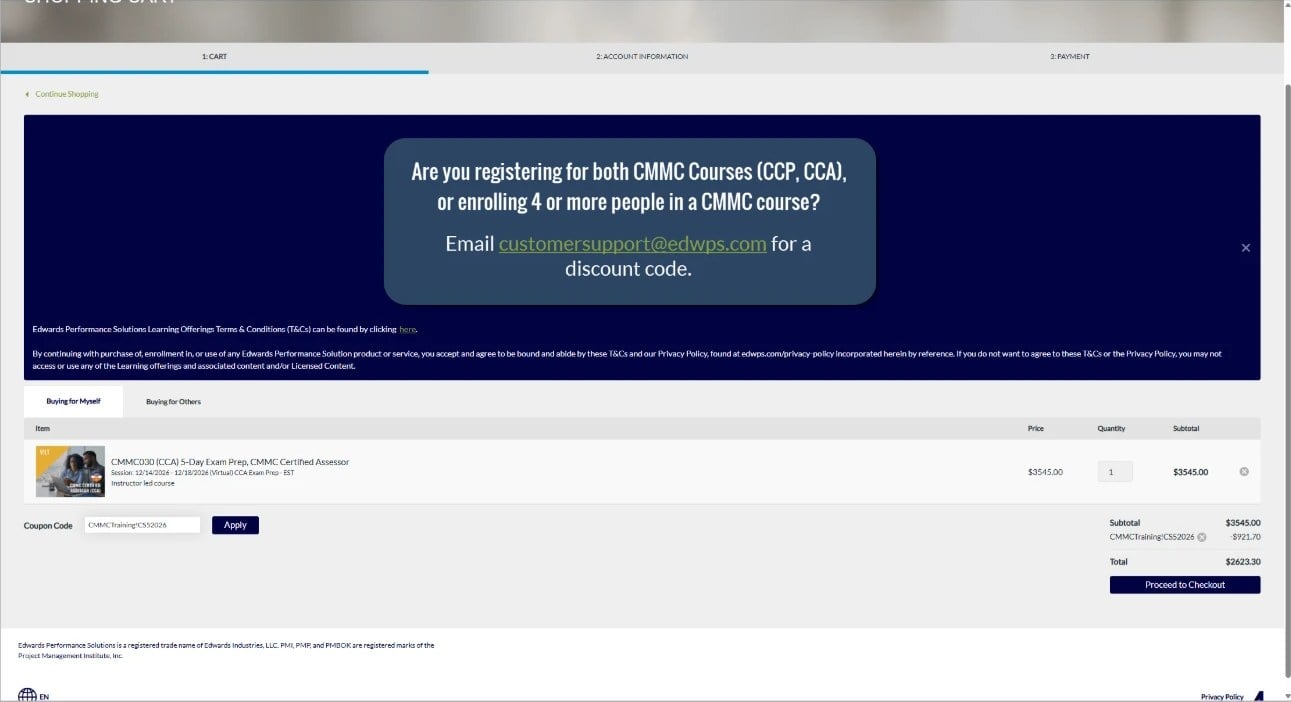
A green Added to Cart note pops up at the bottom right. Click the cart at the top right, then View Shopping Cart.
Stay on Buying for Myself. Paste the code in Coupon Code and click Apply. The discount shows under your subtotal right away.
Click Proceed to Checkout. Sign in with your LMS account, or click Sign Up if you're new. Forgot your password? Use Forgot Password on the same screen.
Confirm your name, email, phone, and billing address, then click Proceed to Checkout.
Choose Credit Card, check the box to agree to the terms and conditions, click I Agree, then click Proceed to Checkout.
On the secure checkout page, check that your discount shows in the summary. Enter your card number, expiration, and security code, then click Submit Your Order.
Watch your inbox. Our training team emails your class details before your start date.
Save on CMMC training
Use code CMMCTraining!CS52026 on live CCP and CCA classes and Guided CCP in the LMS cart.
Taking CCP and CCA, or enrolling four or more people? Email CustomerSupport@EdwPS.com for a discount code.
Active or retired military qualify for a special discount. Email CustomerSupport@EdwPS.com for your code.
Training a whole team on your own dates? Email training@edwps.com.
Troubleshooting
Type it exactly, with capitals and the exclamation point: CMMCTraining!CS52026. Make sure you're on Buying for Myself, and click Apply before you check out. The code works on live CCP and CCA classes and Guided CCP through Dec 31, 2026. Still stuck? Email CustomerSupport@EdwPS.com and we'll help.
Codes apply in the cart before checkout. If you already paid, email CustomerSupport@EdwPS.com and we'll sort it out.
Email CustomerSupport@EdwPS.com and we'll set it up with you, including group pricing for four or more people.
Use Forgot Password on the sign-in screen. If that doesn't work, email CustomerSupport@EdwPS.com.
Our training team emails your class details before your start date. Questions before then? Email training@edwps.com.
CMMC at Edwards
CMMC TrainingEvery CMMC class we offer CCP Boot CampFive-day live online class
 CCA Boot CampFive-day live online class
 Consulting and AssessmentsReadiness help and Level 2 assessments
A real person on our team answers, usually within one business day. Email info@edwps.com for consulting and assessments.